Make sure you have installed it under “Python 2” folder. FAQ - Python addons in different VC versions - Extensions and Python Add-ons Python 2 and Python 3 scripts import the different module for VC core functionalities, so that might be it. I’ve used Blenderer with 5.0 successfully.
Hi, thanks for the info. I have Blender 3.6 so it’s in the Python 3 folder. Still somehow on VC 4.10 the Blender addon works even I updated from 2.3 when I installed VC 5.0.
Blenderer is compatible with Python 2 and Blender 3.6.
I also encountered this problem. I asked Codex to make a revised version. If anyone else has the same issue, they can refer to it.(The VCMX file might be encrypted. Please use the original version of Lights.)
Blenderer_2_3_0__LD.zip (212.1 MB)
1 Like
Please note that the above zip is done by a non-staff member and a first time poster, use at your own risk. It is also not verified also the staff won’t be verifying this.
1 Like
When creating animations, where is the final video saved? I recorded an animation and can see the ~7500 pictures that were generated in Pictures → Blenderer → Picture_frames, but can’t find the video.
Edit: never mind, it’s in the same folder. Didn’t notice it at first, because it was called Picture, but it was an mp4 file 
Hi,
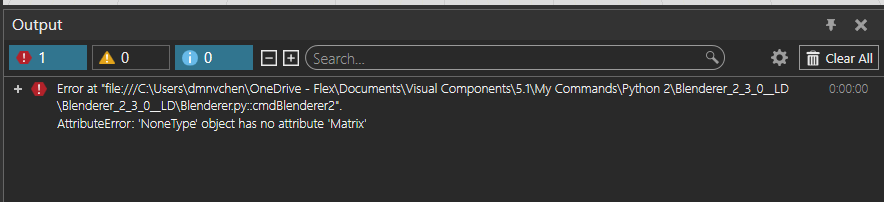
While running Blenderer this error pops up.

do you have any idea how can I solve this problem?
Thx!
I would try first the recommended Blender version, which is 3.6 LTS. You seem to have 5.1.1.
As Harriv said, the original plugin is only supported up to version 3.6, if you want compatibility with higher versions, you can use it with this one:
If you’re really curious as to why, the specific reason is that the new version of Blender has updated the import API, which has caused the original plugin to not be compatible with higher versions of Blender.
@BAD Can I use Blender 5.1 with this latest plugin?
You can try it, after all I didn’t use this plugin of his, but idkfa’s original comment was that this would make the current blender plugin compatible with the latest version of blender.
Personally I am using an IDE that has made code changes to be compatible with the new API of blender 4.x. In fact it seems that Blender 4.x to Blender 5.x is currently an import API.
Nope… you still need to use Blender 3.6. The BlendererBooster is meant to fix glitch issues.
1 Like
Hmm, okay, looks like I misunderstood. But as I said above, the root cause is that Blender 4.x changed the component import API, so the original add-on can’t be imported. Just replace the import API and it’ll import normally.
Thx Harriv!
It is working well.
1 Like

Blenderer.py (62.9 KB)
Hi, I have updated to 5.1, and my Blenderer addon stopped working.
I have edited the blender.py file (inside the blenderer addon folder) with a tempory work around and it is now working for me.
I have not tested the fix for animations yet, just for still renders.
Hi, Blender 3.6 LTS has reached end-of-life in June 2026. When is an update to a new version of the add-on scheduled?
1 Like
You seem to have user modified version (*_LD). The official version and Blender 3.6 LTS has worked fine for me.