Now that VC 5.0 with Python 3 has been released, here is some information on Python addons and how to install them.
Older addons may include a readme or installation instructions in the message. These instructions might be obsolete, as there are differences to where addons should be installed between the latest 4 VC versions.
How to install a Python addon?
Usually addons are distributed as a .zip file. Extract the zip file.
The extracted folder contains .py files and sometimes also other files. It is important that all these files remain in same folder.
Move the extracted folder to Python addon installation location. When starting the software the next time, the addon is available in VC.
Alternatively, install the addon by drag-and-drop. This way you can use an addon without restarting the software.
Python 2.7 addons have a init.py file. It is responsible of adding the command’s icon to the user interface of VC. Drag and drop the init.py to the 3D world.
Python 3 addons require that the main addon file starts with “cmd”, but init.py is not required. Drag and drop the main addon file to the 3D world.
Remember to select Python 2 or Python 3 from dropdown. In 5.0 it defaults to Python 3. Installing Python 2 addon as Python 3 does not work.
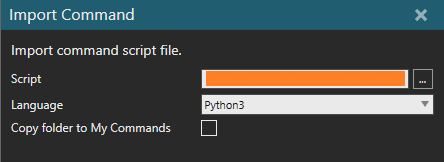
Picture 1: Installation options when addon is drag-and-dropped to application.
Where to install Python addon files?
VC 5.0 or newer:
Addons made using Python 2.7 API are installed to /Documents/Visual Components//My Commands/Python 2/.
Addons made using Python 3 API are installed to /Documents/Visual Components//My Commands/Python 3/.
VC 4.9 or 4.10:
Addons are installed to folder /Documents/Visual Components//My Commands/Python 2/.
Python 3 addons can not be used in these versions.
VC 4.8 or older:
Addons are installed to folder /Documents/Visual Components//My Commands/.
Python 3 addons can not be used in these versions.
How to know whether an addon is Python 2 or Python 3?
Preferably authors of future addons would tell, is the addon made in Py2 or Py3. If not, here are some ways to determine, if the addon is Python 2 or 3.
- Publishing date: If the addon was published here before March 2026, it is made in Python 2
- Init file: If the addon does not have a __init__.py file, it is made in Python 3.
- Contents of the addon script: Check the imports in beginning of the addon script.
If there is “import vcCore” or “from vcCore import *”, the addon is made in Python 3.
If the __init__.py has “from vcApplication import *” and the main addon file has “from vcCommand import *”, the addon uses Python 2.
Topics not covered by this thread:
How to develop addons in Python 3?
Refer to our documentation in vcCommand - Creation . This thread is reserved for information on installing addons.
How to migrate addons from Python 2 to Python 3?
Refer to our documentation in Py2-Py3 Class Map and Py2-Py3 Enum Map. This thread is reserved for information on installing addons.
I have encountered a bug.
Contact the support of Visual Components or a regional partner. Please share all possible information the support agent asks, so that the bug can be reproduced and therefore fixed.