I know this topic has likely been discussed before, but I believe my situation has a unique twist.
I am trying to figure out if there is a way to control the ‘wait time’ for an AMR (Autonomous Mobile Robot) or a human resource. Specifically, I want to set the amount of time that the resource will wait at a node before deciding to move on. It seems like there might be a setting for this, but it’s not clear to me.
Additionally, I want the resource to load up to a specified quantity (X) and then distribute it as needed. I prefer a ‘push’ system rather than a ‘pull’ system. Currently, I have the model set up to deliver multiple items based on requests from the receiving nodes. However, I would like the resource to wait until it has a full load (or until a set time has passed) before distributing the items to any requesting node. If only one node is requesting, it should get all the items.
My main issue is that nodes requesting 3 components will not release them until all 3 components are present. This causes the simulation to ‘lock up’ if there are only 1 or 2 components available, especially since I don’t always run my feeders in a loop.
Does anyone know if this functionality exists in Visual Components? Human_Multi.vcmx (583.5 KB)
Hello!
There are different ways of doing it. In the eCatalog in “Layout Templates” there is an example of “Batch Transport” where you could find some useful infos.
The tricky part is that the products are arriving on a conveyor.
One possibility could be to have a process just after “FromConveyor” where the products are all stacked before the resource take them. You could use a Mission Controller to move the resource at the correct position, make them wait there until you receive a signal that all products arrived for example, and then use a Mission step “Collect” with “CollectAll” activated to get all products at once. (I didn’t try it, but I suppose this could work…)
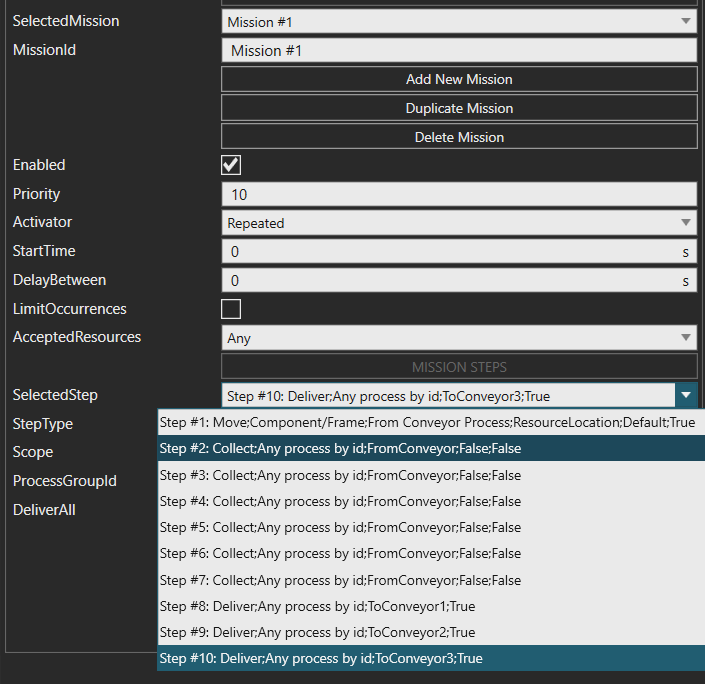
Another possibility would be to just use a Mission Controller and repeat the “Collect” step with “CollectAll” deactivated, until you have all products, then go deliver them. You can Copy Paste the “Collect” steps in the Editor to make it quicker:
I made it more complicated than it has to be. It could work really well also without the Missions.
Like in the example from Layout Templates, you could use a process just after the “FromConveyor” with a TransportPatternIn statement to stack the products before the TransportOut. The FromConveyor and this process need to be linked with an “InterpolatingTransport” and not the “ConveyorTransport” as the implementer.
Then instead of using Missions to make the Resource wait in front of the process, you can use the ReserveResource method and a “Work” statement before the TransportPatternIn, so that the resource comes and waits.
You could use the TransportPatternIn helper to make the number of products transported more flexible.
Is there any way to make this work if the ‘To Conveyor’ nodes are not requesting more than 1? For instance, still picking up 6 cans, but then distributing either all 6 to one, or 2 to each?
Also, is there any way to work in that delay tolerance idea? I see you have a bit of batch thing going with the feeder. Is there any way to make the person go regardless of qty (as long as it is 1 or more) after a certain amount of time has passed? I would say something like 5 seconds or so, if no more are there the person heads out.
Here is another try with a Buffer statement instead of a TransportPatternIn. So that Anna doesn’t just take the available products and go away, I added a process where she waits until the time is over (I set it on 30s) or until there are enough products in the buffer. It is using a value from the statistics, so you need to set the statistics intervall on 1s and the process node shouldn’t be connected on the conveyor!
You can try using the Capacity Pull Process and set the capacity on what you want to get several products.
@Tilma This is working great! It seems like a very good solution. I had a couple of follow ups, if you have the time.
First, I am wondering where the ‘PartsCurrent’ comes from. I can intuit that it is looking at the capacity of ‘Process #1’ node, but I do not know how it is referencing it.
Second, I am wondering if there is some way to reference the qty on the conveyor directly, rather than at the node. It sort of ties into what you mentioned earlier, and would clean things up a bit. Another big benefit would be that we could accurately set the conveyor capacity and limit it based on the geometry. As-is, the parts get to sit in the air for ‘free’ / they don’t take up room on the conveyor.
Again, overall a great solution, just wondering if we can’t take it one step further!