Ah, I see the issue now.
The component signal to stop the product comes from volume sensor Vol4. As the component signal was using a precise test instead of bounding box intersection, it doesn’t detect the entire assembly but rather a part inside the assembly. We need to start/stop the movement of the upmost component in the hierarchy.
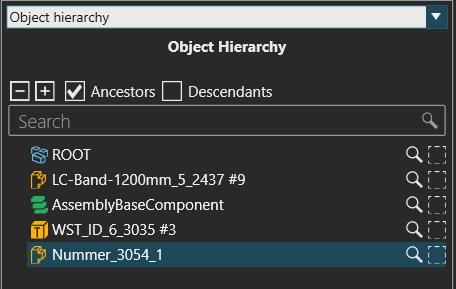
Assembly products in VC belong inside an invisible dynamic component ‘AssemblyBaseComponent’. This can be seen using the Inspector addon. The part that was detected by the volume sensor was two levels under the assembly base component:
For using raycast or volume sensors with assemblies, we can make a small addition to the script:
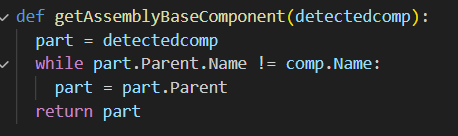
We call this function for the component signal’s value: while the detected component’s parent is not the conveyor, we go one level up in the node hierarcy. The Conveyor Sensor component’s raycasting mode has something similar.
Here’s the modified layout.
Shared Layout fixed.vcmx (343.1 KB)
(Note: ComponentPathSensor behaviour isn’t affected by this detail, as it detects the leading edge of a bounding box. The assembly base component’s bounding box is sized to fit the bounding boxes of all products inside the assembly. Also I believe there might be some built-in mechanism for detecting the correct component from the node hierarchy, but I am not sure.)