I would like to disable automatic version updates and use it as is.
Is there a way to disable version checking from the outside?
If not, could you please improve it so that this is possible?
Hello @TSy,
I am unable to install it on my system. I am using VC 5.1 Professional & a server based license. I downloaded the file “Plugin.Inspector.Bootstrap.vc5.dll” (from a post on Mar 13) & pasted it here (C:\Program Files\Visual Components\Visual Components Premium 5.1\).
Now when I restarted my VC, it pops a error as “0:00:00 | Error | Inspector: Failed to get latest inspector installer information from server.” and “0:00:00 | Error | Inspector: Failed to install the inspector add-on.”
Can you help me how to resolve this !
Can you help me, which firewall access does it requires. So that IT guys can directly help locate & approve it to get it resolved
Thanks for the great debugging tool!
Actually I think there is a problem with Process Modelling Statements, in the older version when I was searching a Property it would also locate uses in Statements in Process Modelling, the newer version unfortunately does not locate them… Still finds the usage in Features but nothing from Process Modelling… Is there a way to fix this back to the older version?
I looked into it, and seems it is a regression from search infrastructure refactoring that was done to support some new features. The statements are traversed but no longer get their ancestor chain tying them to components so they get filtered out.
I’ll fix it for next update on the 3.5 beta. Don’t know yet when that will come out, though.
1 Like
Inspector 3.5.1 Beta Update
Inspector 3.5.1 beta is available for Visual Components 5.1.
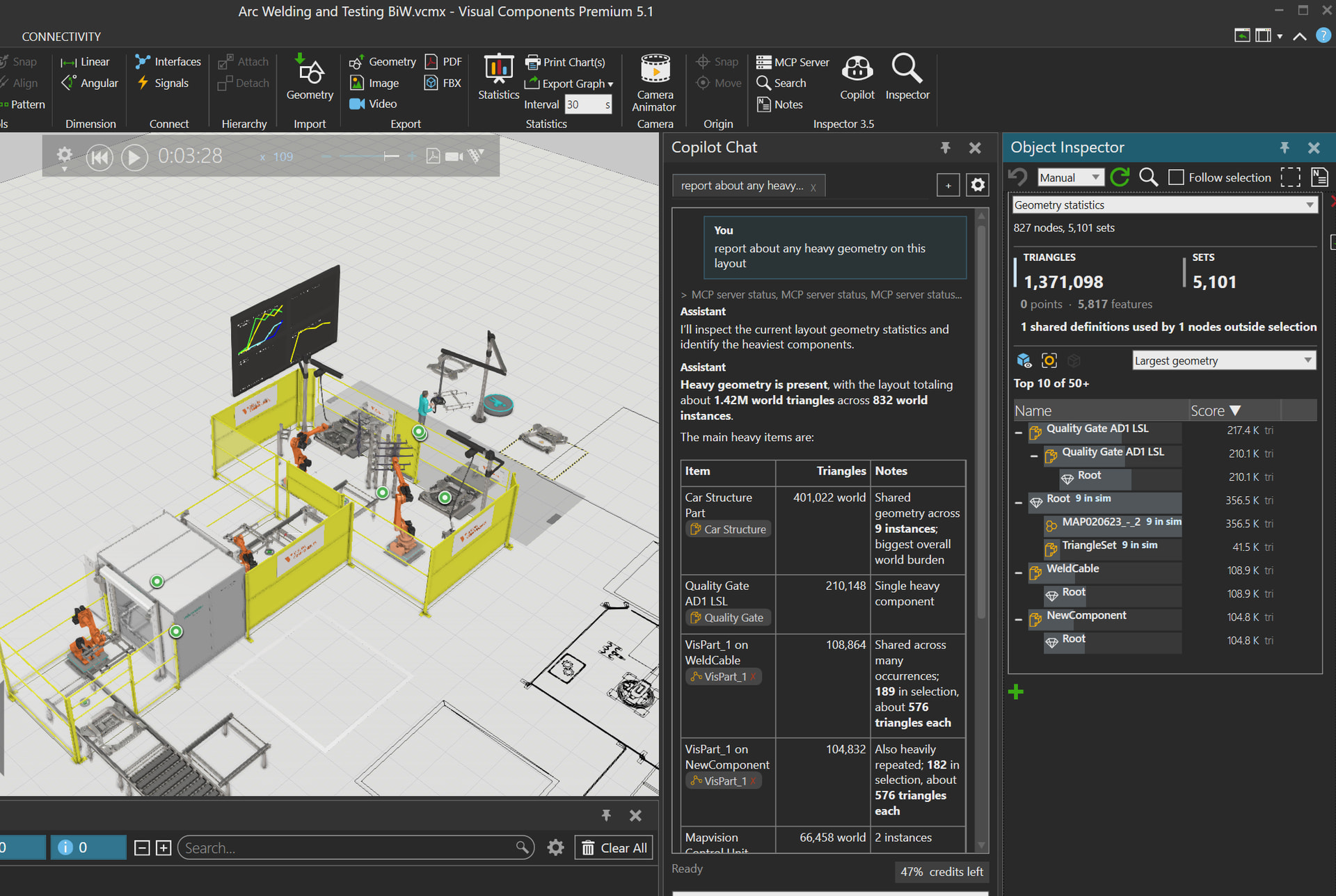
Layout Analysis
- Added Geometry Statistics for analyzing triangle counts, render density, visibility, shared-definition impact, and geometry hot spots in a layout
- Added geometry overlays and inspection actions to make complex or expensive visual content easier to locate
- Fixed Inspector search hierarchy for robot and process programs, routines, and statements
Integrated Copilot Chat
- Added Mermaid diagram rendering in Copilot Chat, with a bundled local renderer
- Added a lightbox for chat images and diagrams, plus actions to copy them as images or save them as PNG files
- Unified Markdown rendering in Copilot Chat and Notes, including images, diagrams, and interactive object references
- Switching between Ask and Edit mode now keeps the active conversation context
- Made it easier to sign in with a GitHub Copilot subscription and select an available model
- Added GPT 5.6 Luna and GPT 5.6 Terra to the free-trial settings. Both are more capable than GPT 5.4 and GPT 5.4 Mini; GPT 5.6 Terra is recommended, while Luna is the lower-cost option
- Fixed a free-trial issue where tool-call failures could stop the agent
- Added an animated Copilot avatar on the chat welcome view
Workspace And Reliability
- Updated the packaged Visual Components Copilot workspace to version 1.5
- Updated the workspace Python API content and guidance for Visual Components 5.1
- Expanded AI guidance for component authoring, Process Modeling transport flow, robot programming, and Python scripting
- Improved built-in help and Python diagnostics, including better formatting for extracted help content
Beta Channel
- Inspector 3.5.1 remains a beta-only update for Visual Components 5.1
- Existing beta users receive it through the normal Inspector update process
- To join the beta channel, set
"ReleaseChannel": "beta"inInstaller settings.jsonand restart Visual Components
2 Likes
Hello, my network may not be able to complete the update download, and the software prompts the following error when starting.
0:00:00 | Error | Inspector: Failed to download and install the inspector add-on.
Unfortunately I can’t support use in heavily network-restricted environments because the add-on development relies heavily on delivering automatic updates.
I could potentially provide a website that lists all the versions for manual download, but it would take some effort to implement and the manual install would be tedious to use. Each build of the inspector add-on only works with a very narrow range of VC versions due to technical reasons.
Basic website launched for the Inspector add-on: https://inspector.4111778.xyz/
It includes full (AI generated) user manual. Content search and version catalog for manual install might come later.
4 Likes
Added experimental AI-powered search / answer thing to the website.
It is backed by large database of pre-processed publicly available knowledge about VC, such as general capabilities, specific how-to snippets, and solutions to common problems. Full API details are not included, so it is not a coding bot.
hi all,
I placed the “Plugin.Inspector.Bootstrap.vc5.dll” file inside the 5.1 folder:
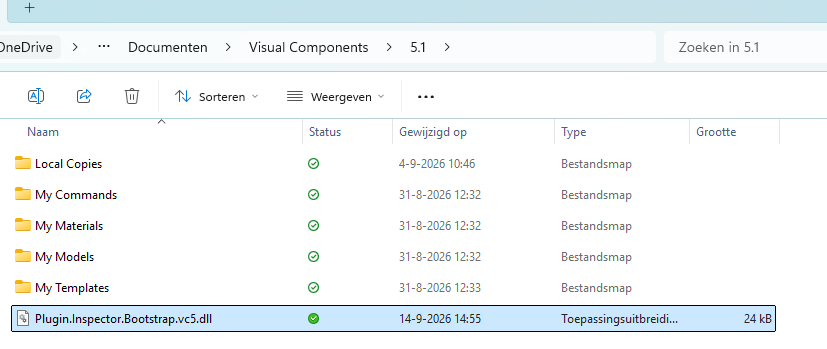
(Also tried to place it under My Commands\Python 3 with the same result).
Unfortunately there is nothing showing up in my ribbon:

Am I missing something?
Hey Jesper,
Try to drop it in
“C:\Program Files\Visual Components\Visual Components <version>”
and then restart the software
br,
lefa
1 Like
Ah that fixed it, thanks Lefa!
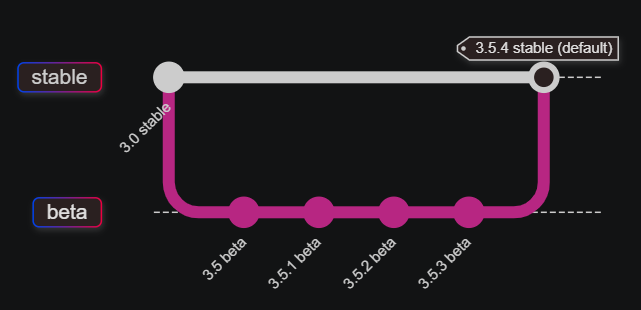
The latest version (3.5.4) has been released on the main release channel. Users with the beta channel enabled should move back to the main channel as the beta won’t receive further updates unless a new beta starts for some future version.
Hi,
first of all, thanks for developing Inspector. The MCP integration looks very promising for analyzing Visual Components layouts and simulation data.
I have a question regarding the MCP server implementation:
Is the Inspector MCP server tied specifically to GitHub Copilot, or is it possible to connect other MCP-compatible clients as well, such as:
- Claude Code / Claude Desktop
- OpenAI Codex
- ChatGPT Desktop with MCP support
- Other MCP-compatible tools
From my understanding, MCP should be model-agnostic, so I was wondering whether the current implementation already works with alternative clients or if there are any technical limitations that currently make GitHub Copilot the only supported option.
If it is not supported today, do you see this being possible in a future version?
Thanks in advance!
There is nothing copilot specific in the Inspector’s MCP server itself, it should work with any AI tool that implements general MCP client.
However, agents’ ability to use the MCP server effectively is greatly enhanced by the copilot workspace that the inspector also installs. It contains additional local MCP servers and skills.
Those are also usable in other tools but the configuration is provided in formats that only GitHub Copilot SDK and GitHub copilot in VS Code support directly.
They should be rather easy to convert to other tools’s format by using e.g. your preferred AI tool.
1 Like