Here are two examples of exchanging data with a local PostgreSQL database using Python 3 introduced in VC 5.0.
The examples have been tested using PostgreSQL version 18 and pgAdmin 4.
1. Prerequisites
Install psycopg2 library for VC’s Python environment using pip. Example command line command for Premium 5.0:
"C:\Program Files\Visual Components\Visual Components Premium 5.0\Python 3\python.exe" -m pip install psycopg2
After installing the library successfully, restart VC 5.0.
2. Disclaimers
This example promotes working only with a local database, and not working with production databases. Be cautious of risks regarding loss of data and general security aspects of databases. For any addons developed based on these examples, remember to verify security against SQL injection.
3. Example of fetching data from a database
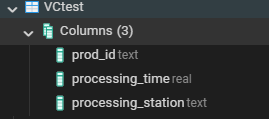
Assume a table with the following columns and some pre-existing row entries:
Use the following script in a new component:
import vcCore as vc
import vcBehaviors as vc_beh
import psycopg2

# Database credentials
DB_USERNAME = "YOUR USERNAME HERE"
DB_PASSWORD = "YOUR PASSWORD HERE"
DB_NAME = "postgres"
DB_HOST = "localhost"
DB_PORT = "5432" # Note: Number as a string

connection = None

sim = vc.getSimulation()

def OnReset():
  global connection
  if connection:
    connection.close()
  connection = None

async def OnRun():
  global connection

  connection = create_connection(
    db_name="postgres",
    db_user=DB_USERNAME,
    db_password=DB_PASSWORD,
    db_host="localhost",
    db_port="5432"
  )

  await select_query_loop()

async def select_query_loop(interval=60.0):
  """Makes a SELECT query every interval and prints the result."""
  query = 'SELECT * FROM "VCtest";'
  while True:
    if connection:
      rows = run_select_query(query)
      print(rows)
    await vc.delay(interval)

#region PostgreSQL helpers

def create_connection(db_name, db_user, db_password, db_host="localhost", db_port="5432"):
  """Create a database connection to PostgreSQL."""
  try:
    conn = psycopg2.connect(
      dbname=db_name,
      user=db_user,
      password=db_password,
      host=db_host,
      port=db_port
    )
    print("Connection successful")
    return conn
  except psycopg2.OperationalError as e:
    print(f"Connection error: {e}")
    return None

def run_select_query(query):
  """Runs a SELECT query and returns all fetched rows."""
  if not connection:
    return
  try:
    with connection.cursor() as cur:
      cur.execute(query)
      rows = cur.fetchall()
      return rows
  except Exception as e:
    print(f"Error executing query: {e}")
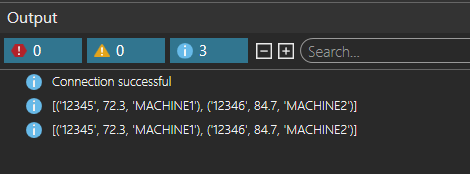
Output in VC will be the current rows of the database table every 60 seconds:
4. Example of writing data to a table
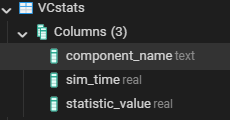
Consider the following table with no pre-existing entries.
Use the following script in a new component:
import vcCore as vc
import vcBehaviors as vc_beh
import psycopg2

# Database credentials
DB_USERNAME = "YOUR USERNAME HERE"
DB_PASSWORD = "YOUR PASSWORD HERE"
DB_NAME = "postgres"
DB_HOST = "localhost"
DB_PORT = "5432" # Note: Number as a string

connection = None

sim = vc.getSimulation()

def OnReset():
  global connection
  if connection:
    connection.close()
  connection = None

async def OnRun():
  global connection

  connection = create_connection(
    db_name="postgres",
    db_user=DB_USERNAME,
    db_password=DB_PASSWORD,
    db_host="localhost",
    db_port="5432"
  )

  await insert_query_loop()

async def insert_query_loop(interval=60.0):
  """Makes an INSERT INTO query every interval and inserts throughput statistic in the database."""
  world = vc.getWorld()
  comps_and_stats = [(c, c.findBehavior(vc_beh.vcBehaviorType.STATISTICS)) for c in world.Components if c.findBehavior(vc_beh.vcBehaviorType.STATISTICS)]

  # Clear table contents in beginning of simulation
  if connection:
    run_query("""DELETE FROM "VCstats";""")

  while True:
    time = sim.SimTime
    for c, stats in comps_and_stats:
      query = """INSERT INTO "VCstats" (component_name, sim_time, statistic_value) VALUES ('{}', {}, {});""".format(c.Name, time, stats.PartsExited)
      if connection:
        run_query(query)
    await vc.delay(interval)

#region PostgreSQL helpers

def create_connection(db_name, db_user, db_password, db_host="localhost", db_port="5432"):
  """Create a database connection to PostgreSQL."""
  try:
    conn = psycopg2.connect(
      dbname=db_name,
      user=db_user,
      password=db_password,
      host=db_host,
      port=db_port
    )
    print("Connection successful")
    return conn
  except psycopg2.OperationalError as e:
    print(f"Connection error: {e}")
    return None

def run_query(query):
  """Runs a query and commits the change."""
  if not connection:
    return
  try:
    with connection.cursor() as cur:
      cur.execute(query)
      connection.commit()
  except Exception as e:
    print(f"Error executing query: {e}")
This example writes the value of statistic PartsExited of each component that has a statistics behavior every 60 seconds. We can verify from PostgreSQL admin panel that rows were indeed added by the script.